

Rollout in progress · checked 17 November 2026
Google began rolling out the update worldwide and across all languages at 18:06 UK time on 10 November. Google estimated up to two weeks and had yet to post a completion date. Google Search Status Dashboard
Save 3–9 November in Search Console now. Once Google confirms completion, wait at least a full week, then compare seven fully reported days with that baseline. Google’s comparison guidance · Page review worksheet
If your team has time to investigate one page, start with the searches that bring in people who might actually buy. Check whether they can still find the page and do what they came for. Before I commission a rewrite, I want to see where somebody gets stuck and what would help them take the next step.
What a core update changes
Google uses core updates to make broad changes to the systems that select and order search results. They reassess results across many searches as the web changes. A page can gain or lose visibility while its own content stays the same. Google explains the purpose and scope in its core update guidance.
For a business, the consequence depends on who can still find the site. Someone comparing providers may need to check your service, see evidence of the work and decide whether to enquire. Losing visibility for that search could reduce opportunities to win a customer. To decide what deserves attention, trace the change from the search to the page and, where the records allow, through to the enquiry.
What to save in Search Console now
- In Performance → Search results, choose Web and export Pages and Queries for 3–9 November 2026, inclusive, using the report’s Pacific Time dates. Save clicks, impressions, click-through rate and average position. Record the property, filters and export date. For a priority page, filter to the URL shown under Pages and export its Queries view. Keep the page totals, since Search Console omits some queries. Record a missing page row as unavailable. Search Console dimensions and filters
- Record 10 November as the rollout start in an annotation or a dated note. Alongside it, log releases, redirects, promotions and tracking changes. Fix a confirmed broken form or indexing error when you find it and record the fix. If you use the dedicated Generative AI performance report, flag Google’s impressions undercount on 9–11 November in that report. Chart annotations · Search Console data anomalies
- Save an earlier week with the same weekdays, such as 27 October–2 November, if you have it. After completion, use the same filters for the first seven full Pacific Time days and check that Search Console has finished reporting them. Keep the earlier week alongside the standard comparison, especially when the difference comes down to a handful of impressions or clicks. Google’s comparison guidance · Search Console data availability
What else could explain the change?
On 6 November, we redirected the old encanta.agency site to our existing encanta.digital site. That date sits inside the baseline week. For a page with an equivalent on the old site, I’d check the old and current URLs in their respective Search Console properties. If the old page loses impressions while the current page gains them for similar searches, that’s a reason to check which URL Google is showing. I’d keep the effect of the core update unresolved until the post-rollout data and those checks give us more to go on. Google’s guidance on monitoring old and new URLs
The calendar matters too. If the rollout ends on 24 November Pacific Time, the first seven full days would be 25 November–1 December, including Black Friday and Cyber Monday. Keep that first comparison. If shopping or promotions affect the searches you care about, also compare equivalent weekdays around last year’s event and check whether the movement persists into the following week. A drop in impressions across the same queries with roughly steady positions is a reason to check demand. Black Friday dates · Cyber Monday dates · Google’s guidance on seasonal traffic changes
If Google traffic drops, choose what to investigate
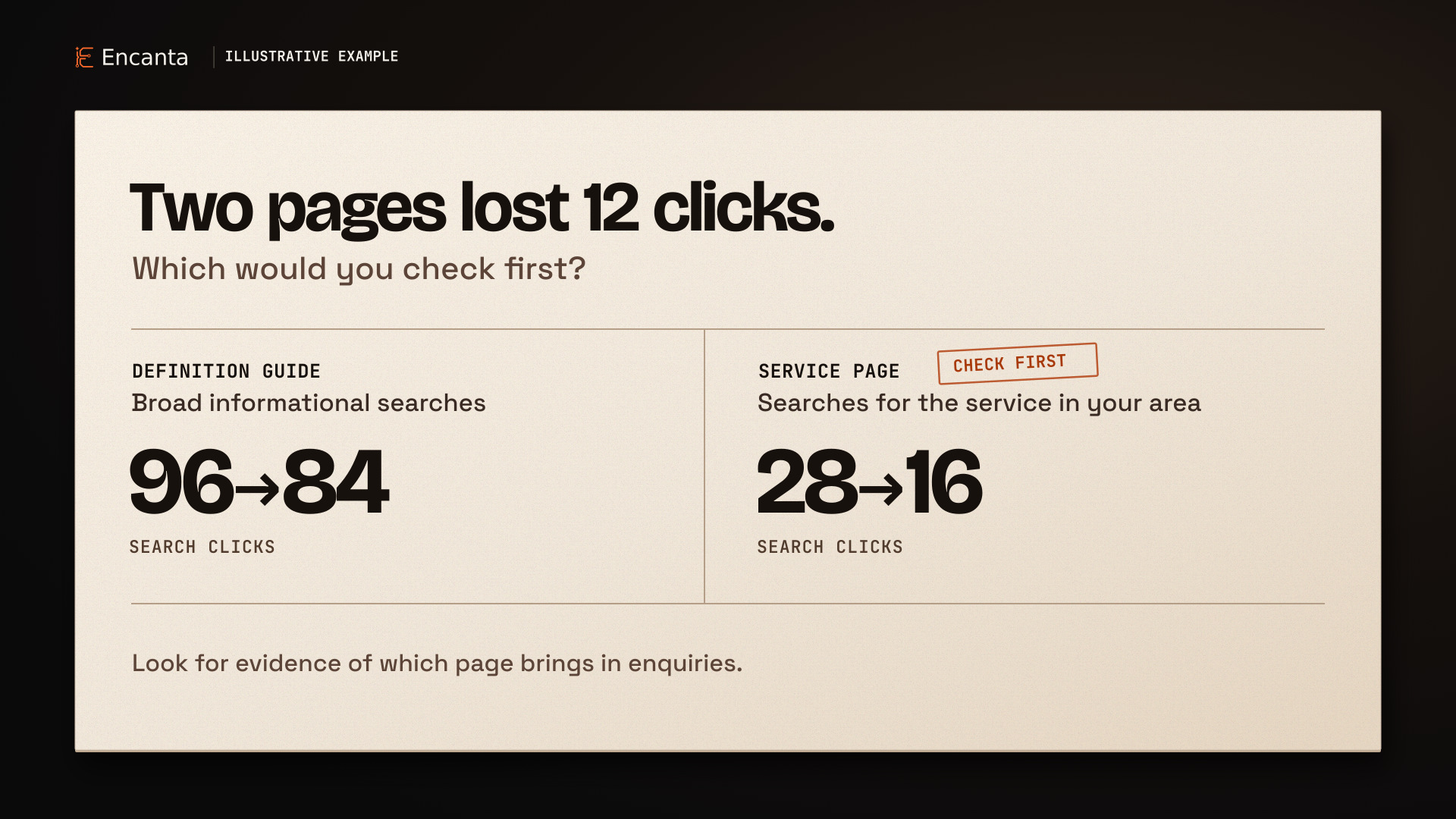
Two pages can each lose 12 clicks and leave you with different jobs. In this illustrative weekly comparison, a guide goes from 96 to 84 clicks, mostly on a broad definition search. Your service page goes from 28 to 16, with losses on searches for the work you do in your area. If that pattern persists, I’d check the service page first. I’d change that order if enquiry records showed the guide was a common route into the service. With search clicks alone, leave the effect on enquiries as unknown. You can trace local search through to booked work or use our guide to tracking Google enquiries in GA4 to investigate further.
- Monitor. You have a small swing and the longer view shows no sustained change on the queries you care about. Keep the page as it is and put a date on the next check.
- Check search or the site. If impressions hold but clicks fall on the same queries, check the title and description that Google shows and what else appears in the results. If several URLs lose visibility after a release, inspect their indexing, canonical URLs and redirects. If clicks hold but enquiries fall, test the form and check where the enquiry lands. Google’s guide to investigating traffic drops
- Gather evidence. You suspect a buyer gets stuck, or you have no proof for the answer the page needs. Give someone one job, such as observing a buyer use the page or finding an example you can publish.
- Make a targeted edit. You can point to a specific gap, you have evidence to close it, and you can say what you’ll check afterwards. If a buyer needs to see what they receive, put the example beside the description of what’s included. Then ask the buyer to find and explain it.
If a substantial ranking decline persists across many pages after the rollout, widen the review. Google recommends assessing the site as a whole and asking people outside the business to evaluate it. Review the affected pages alongside the wider site's content and experience.
What I found on our own service page
The post-rollout comparison for our Enquiry Journey Improvement page is pending, and the effect on enquiries is unknown. The page review gives us a buyer question to investigate while we wait for that comparison.
Our Enquiry Journey Improvement page lists a process map, receipt checks and ownership notes. A prospective buyer might ask, Could my team use this handover to pick up the next enquiry? We already show how that works in a fictional dental practice’s inbox, reached through Relevant work on the offer page. The sample shows the patient’s question, the coordinator’s reply and the instruction to check the diary before offering a time.
My decision today is gather evidence. I’d ask a buyer, “Show me what your team would have in front of them when the next enquiry comes in.” If they find the example and explain who acts next, I’d keep the page as it is. If they get stuck at the list, I’d place a link to the sample beside it and give another reader the same task. This proposed buyer test would help us judge the edit by watching whether the reader can find and use the example.
Copy the page review worksheet
Here’s the record for our offer page. The page review is complete and the buyer test is proposed.
- Page and reader decision.
/offers/enquiry-journey. Could my team take over the next enquiry with what Encanta hands over? - Search and enquiry evidence. Post-rollout comparison pending. Enquiry impact unknown.
- What the page shows. The handover list names the checks. The practice view shows the checks and the owner. The route is Relevant work → dental demo → practice inbox.
- Decision and next action. Gather evidence. Naeem to run the find-it task in the next buyer conversation and review the result before changing the page.
- What would change my decision. If the buyer finds the example and explains who acts next, leave the section alone. If they get stuck at the handover list, test the link beside it.
Copy the template for one page. Record what you can see today and mark missing data as pending or unknown. For the decision use monitor, check search or the site, gather evidence or make a targeted edit.
Page URL and reader decision

Search and enquiry evidence
  Before and after, or pending
  Dates, filters, queries and counts
  Enquiries and source, or unknown
  Other changes to check

What the page shows today
  Evidence and any gap you found

Decision and next action
  Action and owner
  Review date or trigger

What would change my decision